Derek Halvorsen
41 · Portland · on a computer
The landing page says automatic reminders — where’s the configuration? What plan includes reconciliation?
When the testers are done, this is where you read it. Four screens, all from one real run on a practice app with mistakes planted on purpose.
A preview · nothing here is made upWho visited, and why each one came. Switch off anyone who is not your kind of user.
41 · Portland · on a computer
The landing page says automatic reminders — where’s the configuration? What plan includes reconciliation?
29 · São Paulo · on a phone
Ok but what does this actually do for me? Does it work with Pix or just US banks?
34 · Manchester · on a phone
Just tell me the free part and let me sign up, I’ll figure the rest out later.
Their screen, step by step, and what they were thinking at each one.
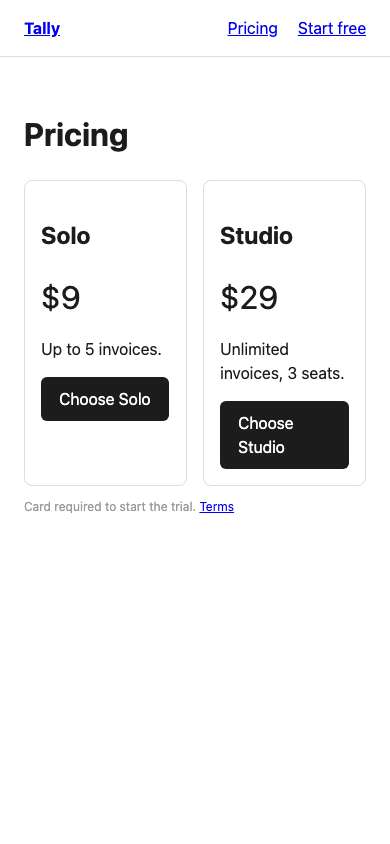
Mariana opens pricing.html
Mariana, thinking aloudWait, this contradicts the homepage. It says “No card needed” there, but pricing only shows $9 and $29 plans and says “Card required to start the trial.” Where’s the free plan? This is exactly the thing I don’t trust. Let me click…
Each thing a tester noticed, on the page where it happened. Filter by who said it or how bad it is.
16 of 16 notes
On signup, the Continue button does nothing: no error, no loading, no next page, even after filling all fields and trying three times.
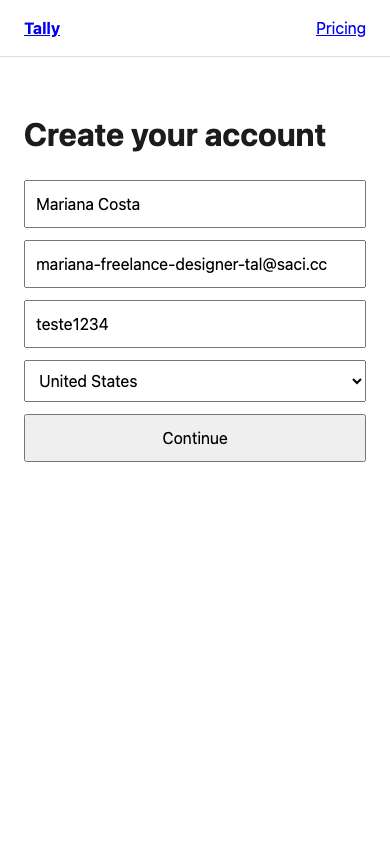
Homepage says ‘No card needed’ but the pricing page only lists $9 and $29 plans and says ‘Card required to start the trial’ — no free plan anywhere; these contradict each other.
Country dropdown on signup only has United States and United Kingdom — no Brazil, and nothing anywhere says whether Pix or Brazilian banks are supported.
On the signup form, the Continue button does nothing: clicking it twice produced no error message, no validation, no navigation, and no confirmation email after 60 seconds. The form simply re-rendered with the same values.
The homepage says ‘No card needed’ while the pricing page says ‘Card required to start the trial.’ These contradict each other directly.
The docs page is a single paragraph: ‘Coming soon.’ For a product whose pitch is bank connection and reconciliation, there is zero documentation of how either actually works.
On signup.html, pressing the Continue button with the form fully filled did nothing twice: no error message, no next page, no confirmation email after 60 seconds.
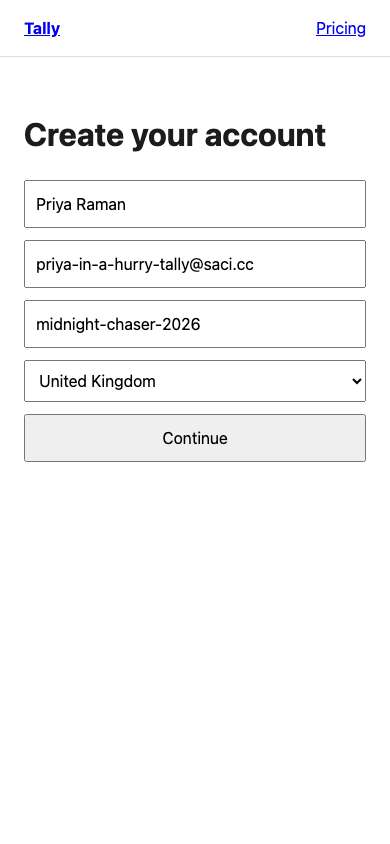
The third signup field has no label or hint; I had to guess it was a password.
Homepage jargon ‘AR automation synergies’ means nothing to a first-time user; the plain ‘How it works’ steps were fine but the tagline undermined it.
The Terms link on the pricing page leads to a 404 ‘Error response’ page.
Pricing doesn’t say which plan includes reminders, late fees, or reconciliation — the core features the homepage advertises. I can’t tell what I’d be paying for at $9 vs $29.
‘Trusted by 12,000 freelancers’ on the homepage with no testimonials, names, or any other proof anywhere on the site.
The third field on the signup form has no label — I first typed my password into the wrong box and only noticed because the Name field showed ‘midnight-chaser-2026’.
The signup form’s third field has no label at all — I had to guess it was a password field. Sloppy on the first form a user ever meets.
Pricing lists ‘Up to 5 invoices’ for Solo but never clarifies whether that’s 5 per month or 5 lifetime, nor what happens after the cap.
The landing page pitch (‘Get paid without chasing anyone’, three how-it-works steps, ‘No card needed’) read in one scroll and got me to signup fast.
The same complaint from three testers becomes one problem, with a fix. Hand it to the AI you build with.
The fixFix the JS error in signup.html’s submit handler (‘reading start’ suggests a missing object/SDK init on the Continue path) and add fallback validation/error display so the form can never silently fail.
The fixPick one story: either add a genuinely free plan or remove ‘No card needed’ from the homepage; align pricing copy the same day.
The fixAdd at least Brazil to the dropdown or state clearly on the homepage/pricing which countries and payment rails (Pix, SEPA, etc.) are supported.
The fixLabel the password field (with a ‘Confirm password’ if that’s what it is) and add field hints.
The fixRestore or write the terms page and put a minimal ‘how bank connection works’ page at /docs until real docs exist.
The fixAdd a feature-per-plan comparison table and clarify the invoice cap period and what happens when it’s exceeded.
The fixAdd at least one named testimonial or remove the number.
### your turn